.NET Core in general has a nice configuration API that I’ve been fond of since .NET Core 1.x. But since Blazor WebAssembly apps run completely on the client, the configuration works a little differently that one might expect.
The way configuration using appsettings.json works is that, a HTTP request is sent to a appsettings.json file. So if the app is available at https://xyz.com, the request goes to https://xyz.com/appsettings.json. You can also use another file-name or path if you want to.
But if you’re just trying to do something like set the Web API’s Base URL, a HTTP request on startup can feel like an overkill. This post shall try and address that.
Source Code:https://github.com/gldraphael/blazor-build-time-configuration
First, we create a custom Attribute to hold our configuration:
 1[AttributeUsage(AttributeTargets.Assembly, Inherited = false)]
 2sealed class BuildConfigurationAttribute : Attribute
 3{
 4    public string? BaseUrl { get; }
 5    public string BuildDate { get; }
 6
 7    public BuildConfigurationAttribute(string baseUrl, string buildDate)
 8    {
 9        BaseUrl = string.IsNullOrWhiteSpace(baseUrl) ? null : baseUrl;
10        BuildDate = buildDate ?? "n/a";
11    }
12}
Next, we apply this Attribute to the Assembly by passing MS Build properties in the .csproj file:
1$(BaseUrl)$(BuildDate)
We could, optionally, set default values for MS Build properties in the same file, like so:
1netstandard2.13.0https://example.org$([System.DateTime]::UtcNow.ToString("dd MMM, yyyy"))
Next, we access the ApiConfigurationAttribute from Main() to configure it with DI, so that it’s accessible to the rest of the application in the usual way:
 1public static async Task Main(string[] args)
 2{
 3    var builder = WebAssemblyHostBuilder.CreateDefault(args);
 4    builder.RootComponents.Add("app");
 5
 6    // Get an instance of the attribute applied to the assembly
 7    var apiConfig = Assembly.GetAssembly(typeof(Program)).GetCustomAttribute();
 8
 9    // Build a config options and register it with DI
10    var baseUrl = new Uri(apiConfig.BaseUrl ?? builder.HostEnvironment.BaseAddress);
11    builder.Services.Configure(o =>
12    {
13        o.BaseUrl = baseUrl;
14        o.BuildDate = apiConfig.BuildDate;
15    });
16
17    // Set the BaseUrl on the HttpClient
18    builder.Services.AddTransient(sp => new HttpClient { BaseAddress = baseUrl });
19
20    await builder.Build().RunAsync();
21}
22
23// AppOptions is defined as
24internal class AppOptions
25{
26    public Uri BaseUrl { get; set; }
27    public string BuildDate { get; set; }
28}
And now we can use it as usual:
1@page "/"
2@inject IOptions options
3
4    **Base URL:** @options.Value.BaseUrl
5        **Last Build:** @options.Value.BuildDate
6
That’s it. dotnet run or running it within Visual Studio will use the dev-environment-friendly default values:
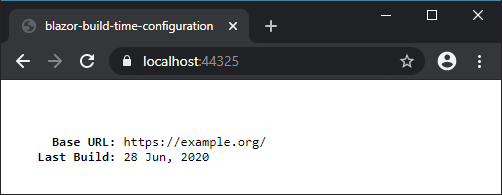 Now all you need to do to set (or override) the MS Build properties (
BaseUrl in this case) in the other environments is to use the -p: or /p: switch:
1dotnet build -p:BaseUrl="https://prod.example.com"
2dotnet run --no-build
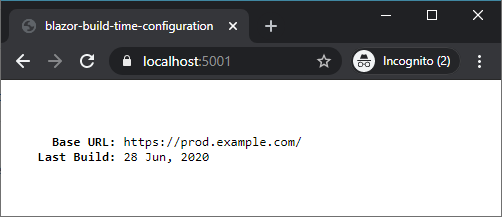 We now have a nice mechanism to use different API Base URLs for different environments, and have environment specific build-time configuration without the need to make a HTTP request.
I think the decision of making a HTTP request to the appsettings.json file was the right one. Because to me a “configurable” app is one that reads configuration at runtime. Build time configuration is like hardcoding the strings — well, different strings — for each environment in our case. So if I were to use docker, I’d now need to maintain an image for each environment if I choose to use “build time configuration”.