Development Containers are awesome because they allow you develop in a sandboxed environment without having to install tools you wouldn’t otherwise use outside a given context.
I’m currently working on a repo with a few jupyter notebooks, but also with code in python and rust. Unfortunately, jupyter notebooks contain a lot of generated code (in addition to actual code), and that skews the numbers causing jupyter notebooks to “take over”.
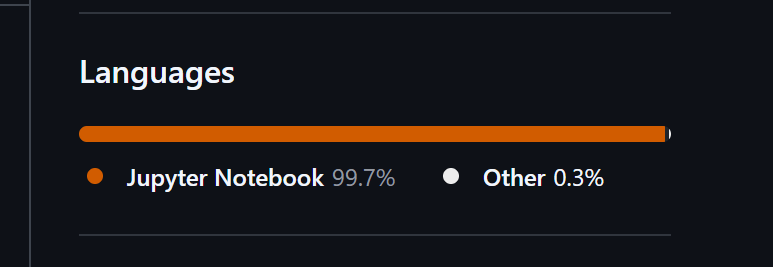 Jupyter Notebook taking over my repo.
One way to fix this would be to update
Jupyter Notebook taking over my repo.
One way to fix this would be to update .gitattributes to override github-linguist’s default behavior, commit the change, push the change to the repo’s main branch, and check if it worked.
However, if this does not work in the first try you’re going to end up with a polluted commit history. A nicer way to update this would be to run github-linguist locally, and test the changes locally before pushing them to GitHub.
1. Configure a dev container
Create a new branch:
1git checkout -b fix/github-language-stats
Create a Dev container configuration file if you do not already have one:
1mkdir -p .devcontainer
2touch .devcontainer/devcontainer.json
Edit the .devcontainer/devcontainer.json file to use Crazy Max’s docker-linguist image:
1{
2  "name": "github-linguist",
3  "image": "ghcr.io/crazy-max/linguist:edge"
4}
Open your project in VS Code and use the Dev Containers extension’s “Reopen in Container” command.
2. Testing changes locally
Open a command prompt withing VS Code (Ctrl+~) and run github-linguist to see the stats for your repo:
1github-linguist
Make changes to the .gitattributes file as needed, commit the file, and test if it worked by running github-linguist again:
1# only commit the .gitattributes file
2git add .gitattributes
3# consider using git commit --amend for future changes
4git commit
5# run github-linguist again to see if it worked
6github-linguist
In my case, I just needed to update .gitattributes to include *.ipynb linguist-documentation. Here’s my before and after:
 When you’re happy with the results, create a PR and merge it.
3. Removing the dev container
Now that we got the .gitattributes down, we simply get rid of the changes in the working tree:
1# Remove changes made to .devcontainer/
2# if you already had an exisiting configuration
3git checkout -- .
4
5# Or delete the .devcontainer/ folder if don't need it
6rm -rf .devcontainer/
It might also be a good idea to get rid of the generated container:
 1# Find the container name
 2docker ps -a --filter "ancestor=ghcr.io/crazy-max/linguist:edge"
 3# The above command returned:
 4# CONTAINER ID   NAMES             IMAGE
 5# 235260acf82f   quirky_chatelet   ghcr.io/crazy-max/linguist:edge
 6
 7# Remove the container
 8docker rm quirky_chatelet
 9
10# Optionally delete the image
11docker image rm ghcr.io/crazy-max/linguist:edge
In closing
The whole process took me about 10 minutes:
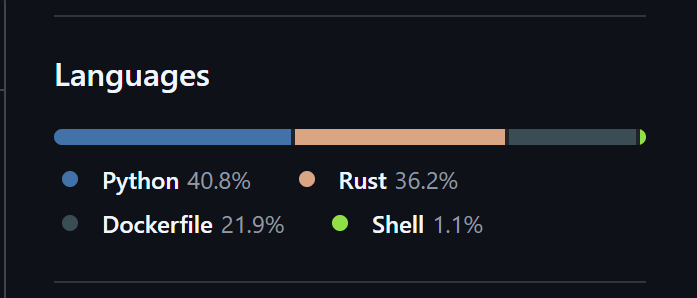 Writing this blog post on the other hand tool close to an hour!