There are times when the state of the app must be retained even if the app is closed.
At first, I used to subclass the Application class and store the application’s state variables there. The Android developer reference, however, says that’s not required:
There is normally no need to subclass Application. In most situation, static singletons can provide the same functionality in a more modular way…
In the following example, we’ll create an AppState class that will be serialized to JSON. This JSON representation will then be stored in the App’s SharedPreferences.
Create the AppState singleton
First we create a singleton class as follows:
 1public class AppState {
 2
 3    private static AppState instance;
 4    public static AppState getInstance() {
 5        if(instance == null) {
 6            instance = new AppState();
 7        }
 8        return instance;
 9    }
10
11    private AppState() {
12
13    }
14
15    // State variables follows
16}
Add state variables
Next, we add the state variables to the AppState class.
1public boolean milk;
2public boolean laundry;
3public boolean bed;
4public String description;
Properties that shouldn’t be persisted, or cannot be serialized should be marked as transient. For example:
1public transient boolean adShownSinceLaunch;
Committing the AppState
Add GSON as a gradle dependency:
1compile 'com.google.code.gson:gson:2.4'
Let’s create two helper functions to serialize and deserialize the AppState:
 1private String serialize() {
 2    try {
 3        return new Gson().toJson(this);
 4    } catch (JsonParseException e) {
 5        e.printStackTrace();
 6        return null;
 7    }
 8}
 9
10private AppState deserialize(String appStateJsonString) {
11    try {
12        return new Gson().fromJson(appStateJsonString, AppState.class);
13    } catch (JsonParseException e) {
14        e.printStackTrace();
15        return null;
16    }
17}
Now, we write the public methods to commit (save) and restore the appstate. I’m storing the appstate in SharedPreferences – you may choose to save it anywhere else.
 1public boolean commit(Context context) {
 2    try {
 3        String serializedString = serialize();
 4        SharedPreferences preferences = PreferenceManager.getDefaultSharedPreferences(context);
 5        SharedPreferences.Editor editor = preferences.edit();
 6        editor.putString("MYPREFERENCENAME", serializedString); // TODO: convert preference name to a static final field
 7        return editor.commit();
 8    } catch (Exception e) {
 9        e.printStackTrace();
10        return false;
11    }
12}
13
14public void restore(Context context) {
15    String prefString = PreferenceManager.getDefaultSharedPreferences(context).getString("MYPREFERENCENAME", "");  // TODO: convert preference name to a static final field
16    AppState as = deserialize(prefString);
17    if (as != null) {
18        this.milk = as.milk;
19        this.laundry = as.laundry;
20        this.bed = as.bed;
21        this.description = as.description;
22    } /*else {
23        // TODO: handle this
24    }*/
25}
Each time a non-transient state variable is added to the AppState class, you will have to assign the new field in AppState.restore(). You may avoid that by assigning the values using reflection instead - but I personally prefer doing it this way.
Using the AppState
The AppState can be accessed from anywhere as follows:
1AppState.getInstance()
The AppState needs to be restored on Application start-up. I would do this in the dispatcher activity’s onCreate():
1AppState.getInstance().restore();
The AppState can be committed as follows:
1AppState.getInstance().commit();
You would want to commit the AppState in the onPause() on Activities where the AppState has been updated.
Also, if you’re going to be accessing the class from different threads, remember to ensure it’s thread-safe.
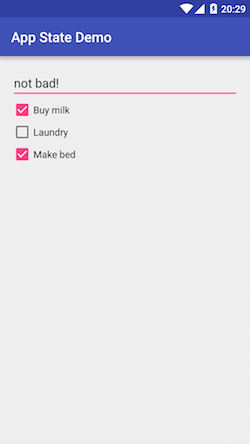
I’ve created a simple working app which you can access from GitHub here.