Cake is the C# counterpart of gulp.js – they’re both task based. Except, we don’t generally pipe things in cake.
From their website:
Cake (C# Make) is a cross-platform build automation system with a C# DSL for tasks such as compiling code, copying files and folders, running unit tests, compressing files and building NuGet packages.
In this blogpost, I’m going to demonstrate some basic usages for those who haven’t used it before.
Tooling
The only tool you’ll need to write and work with cake files is the Cake plugin for Visual Studio Code.
You’ll also need .NET installed, because the cake tool needs .NET to run. Supported versions here. If you’re using the latest .NET full framework / .NET Core / Mono, you’re good to go.
A simple cake file - hello world
Cake build scripts are written in C# in a .cake file. Usually it’s build.cake. Here’s an example of a basic build.cake file:
 1// Create a task called hello
 2Task("hello")
 3  .Does(() =>
 4{
 5  // log a string using Information()
 6  // could also use Verbose(), Debug(), Warning(), Error()
 7  Information("Hello World!");
 8});
 9
10// And run that task
11RunTarget("hello");
If you’ve used gulp.js before, this should feel quite familiar since both are task based.
Installing cake
You can have cake installed:
- locally to your project, (or)
- globally on the machine.
1A. Install cake locally as a local tool (.NET Core 3 onwards)
This is my preferred way of doing installing cake. Every project gets access to the version of cake it needs.
1# Add a tool manifest for local tools
2# if you don't already have one
3dotnet new tool-manifest
4
5# Install cake locally to the project
6dotnet tool install cake.tool
You can now run build.cake as:
1dotnet cake build.cake
For the rest of this post, I’ll assume you’ve installed cake using this method because it’s the most flexible way to add a given version of cake to your project.
1B. Install cake locally using bootstrapper scripts
This is the recommended way, particularly the pre-.NET Core 3 ones. You add two files to bootstrap cake: a build.sh file and a build.ps1 file to the project root. These files will download cake locally to a tools/ folder and use it on consecutive calls to it.
To add the bootstrapper files on VS Code using the Cake extension, press Cmd+Shift+P to open the command palette and select Cake: Install a bootstrapper. You’ll need to do this twice—once for the .sh file and once for the .ps1 file—if you want others to use cake irrespective of their platform.
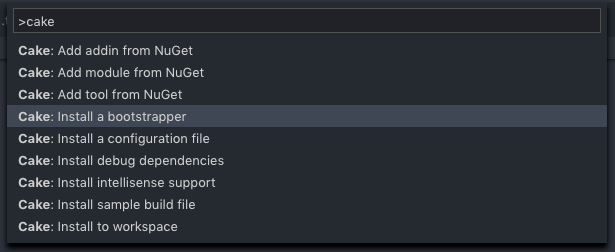 (You can also download the files manually from their GitHub resources repo.)
You can now run the build.cake file using the bootstrapper files:
1# Shell
2./build.sh
3
4# Powershell
5.\build.ps1
2A. Install cake globally as a global tool (.NET Core 2.1 onwards)
1dotnet tool install --global Cake.Tool
You can now run build.cake as:
1dotnet cake build.cake
2B. Install cake globally using a package manager (or manually)
1# Using brew on Mac
2brew install cake
3
4# Using scoop on Windows
5scoop install cake
6
7# Using chocolatey on Windows
8choco install cake
You can now run build.cake as:
1cake build.cake
Tasks and arguments
In the hello-world example, we created a “hello” task using Task(), and then ran it using RunTarget(). Let’s create another task and chain it to “hello” using IsDependentOn().
 1Task("hello")
 2  .Does(() =>
 3{
 4  Information("Hello...");
 5});
 6
 7Task("world")
 8  .IsDependentOn("hello") // hello should be run before world can be run
 9  .Does(() =>
10{
11  Information("...world!");
12});
13
14// We run the world task
15// Since world IsDependentOn on "hello", cake will run "hello" first.
16RunTarget("world");
The only problem with this script is that there’s no way to only run “hello”. We can fix that by allowing the cake file to accept an argument.
 1// We define an argument called "target"
 2// with default value "world".
 3var target = Argument("target", "world");
 4
 5Task("hello")
 6  .Does(() =>
 7{
 8  Information("Hello...");
 9});
10
11Task("world")
12  .IsDependentOn("hello") // implies that hello should be run first
13  .Does(() =>
14{
15  Information("...world!");
16});
17
18// We run the target
19RunTarget(target);
We can now run the “hello” task by passing a value to the “target” argument:
1dotnet cake build.cake --target=hello
Arguments are super handy in CI environments–they let you pass arguments, and let you control which tasks to run.
Real world cake script example
I’ve taken the following example from my side-project called evlog. Original file here:
1#tool "xunit.runner.console&version=2.2.0"
2#addin "Cake.Docker&version=0.10.0"
The #tool directive loads a CLI tool; #addin loads a library. Both of them packaged as nuget packages and can be found at nuget.org. You can load most nuget packages here. So if you wanted to run a git operation, you could use a Cake.Git package, and so on.
  1//////////////////////////////////////////////////////////////////////
  2// ARGUMENTS
  3//////////////////////////////////////////////////////////////////////
  4
  5var target = Argument("target", "Default");
  6var configuration = Argument("configuration", "Release");
  7
  8//////////////////////////////////////////////////////////////////////
  9// GLOBALS
 10//////////////////////////////////////////////////////////////////////
 11
 12const string sln = "./evlog.sln";
 13readonly string testDbContainerName = $"evlogtesdb-{Guid.NewGuid()}";
 14
 15//////////////////////////////////////////////////////////////////////
 16// TASKS
 17//////////////////////////////////////////////////////////////////////
 18
 19Task("build")
 20    .Does(() =>
 21{
 22    DotNetCoreBuild(sln,
 23        new DotNetCoreBuildSettings
 24        {
 25            Configuration = configuration
 26        }
 27    );
 28});
 29
 30Task("startdb")
 31    .Does(() =>
 32{
 33    DockerRun(settings: new DockerContainerRunSettings {
 34            Name = testDbContainerName,
 35            Env = new[] { "MYSQL_ROOT_PASSWORD=Pa5sw0rd" },
 36            Publish = new[] { "3307:3306" },
 37            Detach = true,
 38            Rm = true
 39        },
 40        image: "mysql:8.0.16",
 41        command: null, args: null);
 42});
 43
 44Task("stopdb")
 45    .Does(() =>
 46{
 47    DockerStop(testDbContainerName);
 48});
 49
 50Task("xunit")
 51    .IsDependentOn("startdb")
 52    .IsDependentOn("build")
 53    .Does(() =>
 54{
 55    var projects = GetFiles("./tests/**/*.csproj");
 56    foreach(var project in projects)
 57    {
 58        DotNetCoreTest(
 59            project.FullPath,
 60            new DotNetCoreTestSettings()
 61            {
 62                Configuration = configuration,
 63                NoRestore = true,
 64                NoBuild = true,
 65                ResultsDirectory = project.GetDirectory(),
 66                ArgumentCustomization = args => args.Append("--logger:trx;LogFileName=test_result.xml")
 67            }
 68        );
 69    }
 70    RunTarget("stopdb");
 71});
 72
 73Task("docker-build")
 74    .Does(() =>
 75{
 76    DockerBuild(new DockerImageBuildSettings{
 77        Tag = new string[] {
 78            "gldraphael/evlog"
 79        },
 80        File = "src/Evlog.Web/Dockerfile"
 81    }, ".");
 82    DockerBuild(new DockerImageBuildSettings{
 83        Tag = new string[] {
 84            "gldraphael/evlog-self-contained"
 85        },
 86        Target = "self-contained",
 87        File = "src/Evlog.Web/Dockerfile"
 88    }, ".");
 89});
 90
 91//////////////////////////////////////////////////////////////////////
 92// TASK TARGETS
 93//////////////////////////////////////////////////////////////////////
 94
 95Task("Default")
 96    .IsDependentOn("xunit");
 97
 98Task("azure-pipelines")
 99    .IsDependentOn("xunit");
100
101Task("travis")
102    .IsDependentOn("docker-build");
103
104//////////////////////////////////////////////////////////////////////
105// EXECUTION
106//////////////////////////////////////////////////////////////////////
107
108RunTarget(target);
Using cake in a build environment
Cake is cross platform. But there are a few things you need to know, that might not be quite obvious at first.
- Cake needs .NET to run.
- Using the bootstrapper file would require the full .NET Framework on Windows (Mono on Linux).
- If you use dotnet tools (be it global or local), you won’t need the Full framework or Mono.
- You can use Full Framework cake tool for a .NET core project and vice-versa.
Closing tips
- Let your CI call individual task targets from your cake file to see each step in your CI pipeline (or a single task target that calls the others if you need it).
- Getting used to their API reference page does take time, but once it clicks you’ll be fine.
I’ve been using cake for about 3 years now, and love it. You will too :)